1.2.4 Check Your Understanding – Open-Ended Questions Answers
1.2.4 Check Your Understanding – Open-Ended Questions Answers
The 1.2.4 Check Your Understanding – Open-Ended Questions Answers section is designed to enhance learners’ critical thinking and communication skills by encouraging detailed responses to real-world IT support scenarios. This part focuses on analyzing problems, explaining solutions clearly, and applying troubleshooting methodologies rather than selecting predefined options. By reviewing these expert-verified answers, students can strengthen their ability to articulate technical concepts, justify their decisions, and develop a deeper understanding of effective problem-solving strategies in a help desk environment.
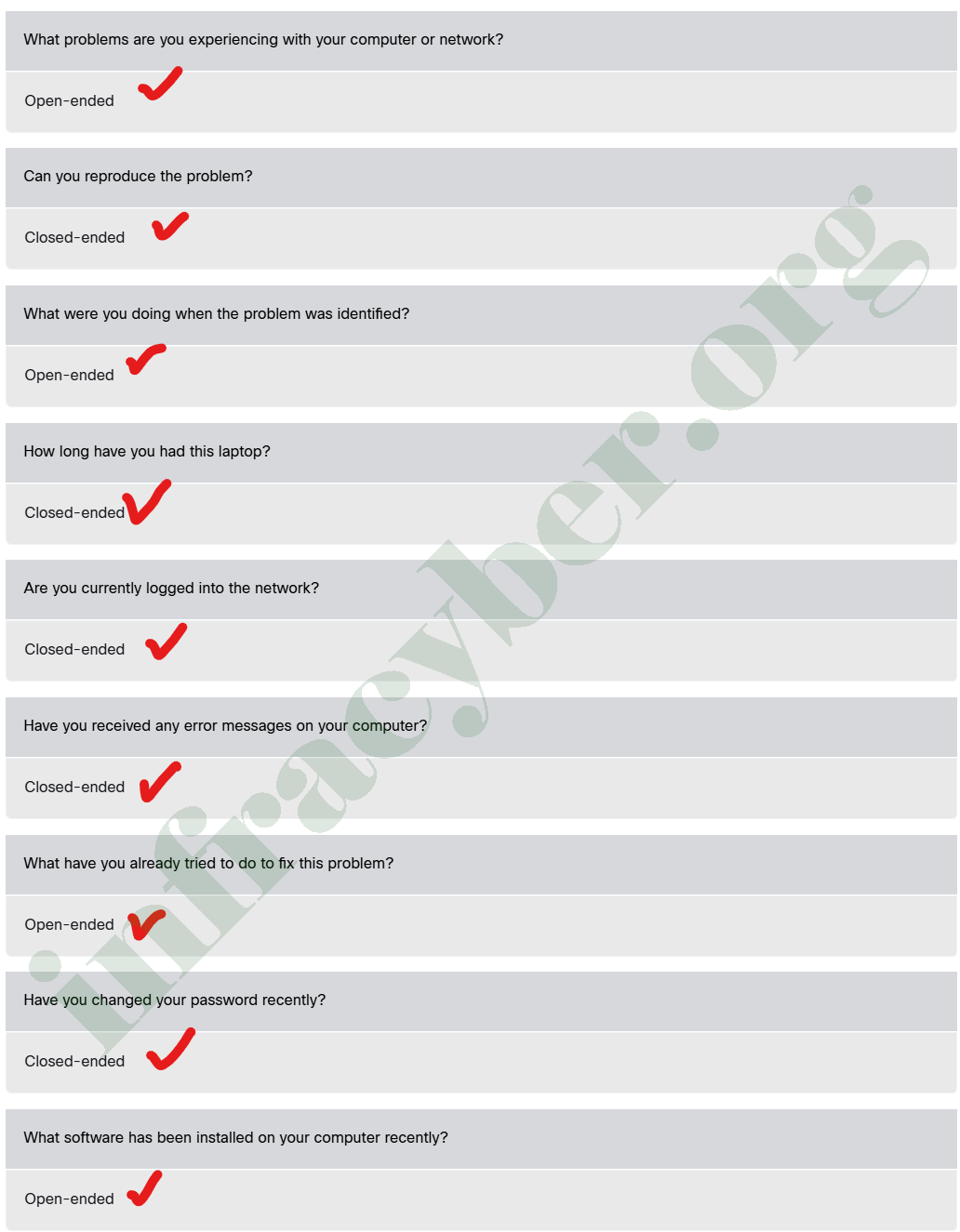
Select whether the following questions are open-ended or closed-ended questions.
🔥 Why this classification really matters
In troubleshooting, the biggest mistake is:
👉 Jumping to solution without understanding the problem
That’s why we use:
- Open-ended → Discover
- Closed-ended → Diagnose & Confirm
Think of it like this:
| Phase | Question Type | Purpose |
|---|---|---|
| 1️⃣ Investigation | Open-ended | Get full story |
| 2️⃣ Isolation | Closed-ended | Narrow down issue |
| 3️⃣ Confirmation | Closed-ended | Verify root cause |
1. What problems are you experiencing…? → ✅ Open-ended
👉 This is the MOST IMPORTANT starting question
- User explains symptoms (slow, no internet, error, crash)
- You get keywords (very important in real troubleshooting)
💡 Example answer:
“My internet is slow and disconnects every 10 minutes.”
👉 From this alone, you already think:
- ISP issue?
- Wi-Fi interference?
- DHCP lease?
2. Can you reproduce the problem? → ✅ Closed-ended
👉 This checks consistency
- YES → Problem is repeatable → easier to troubleshoot
- NO → Intermittent issue → harder (network, hardware)
💡 Example:
- If error happens every time → likely configuration/software
- If random → maybe hardware or network instability
3. What were you doing when the problem was identified? → ✅ Open-ended
👉 This identifies the trigger
💡 Example answers:
- “I installed software” → software conflict
- “I updated Windows” → driver issue
- “I connected VPN” → routing/DNS issue
👉 This question helps find the root cause quickly
4. How long have you had this laptop? → ✅ Closed-ended
👉 This helps detect hardware lifecycle issues
- New → configuration problem
- Old → hardware degradation (battery, disk, overheating)
5. Are you currently logged into the network? → ✅ Closed-ended
👉 This checks basic connectivity/authentication
- YES → problem is deeper (DNS, routing, services)
- NO → basic issue (login, VLAN, authentication)
6. Have you received any error messages? → ✅ Closed-ended
👉 This determines if there is a clear system clue
👉 If YES:
- Ask follow-up (open-ended):
👉 “What exactly does the error say?”
💡 Error messages = gold for troubleshooting
7. What have you already tried…? → ✅ Open-ended
👉 Prevents wasting time
💡 Example:
- User already restarted → don’t repeat
- User changed settings → might be cause of problem
👉 Also helps detect:
- User skill level
- Possible misconfiguration
8. Have you changed your password recently? → ✅ Closed-ended
👉 Targets authentication issues
- YES → possible credential sync problem
- NO → look elsewhere
💡 Very common in:
- Domain environments
- VPN access
- Email login issues
9. What software has been installed recently? → ✅ Open-ended
👉 Looks for recent changes
💡 Example:
- Antivirus installed → blocking traffic
- VPN installed → routing conflict
- Crack software 😅 → malware
👉 Golden rule in IT:
“Most problems happen after a change”
🧠 Advanced Insight (Expert Level)
🔁 How they work together
Step-by-step real flow:
- Open-ended:
👉 “What problem are you facing?” - Open-ended:
👉 “What were you doing before it happened?” - Closed-ended:
👉 “Can you reproduce it?” - Closed-ended:
👉 “Do you get an error message?” - Open-ended:
👉 “What does the error say?”
👉 This creates a logical troubleshooting path
⚠️ Common Mistake (Important for exams)
❌ Asking only closed-ended questions
→ You miss important details
❌ Asking only open-ended questions
→ Too slow, no direction
✅ Best practice:
👉 Mix both strategically
🎯 Final Easy Memory Trick
- 🟢 Open-ended = Explain (Why / What / How)
- 🔵 Closed-ended = Confirm (Yes / No / Specific)
If you want, I can:
✅ Turn this into exam answers format (just answers)
✅ Or simulate a real help desk conversation lab
✅ Or map this to Cisco troubleshooting methodology